- Contact: +91 9958374323
- Email: info@analytx4t.com

Processing 5,000–10,000 vehicle images in 5–10 minutes with more than 95% measured extraction accuracy — transforming manual stockyard audits into an AI-powered workflow.
Industry: Automobile
Solution: AI-Powered Vehicle Stockyard Audit Automation
Core Capabilities: AI Image Processing, VIN and Chassis Number Extraction, Inventory Reconciliation, Automated Spreadsheet Generation, and AI-Powered Reporting
Vehicle stockyard audits are an important part of inventory verification for banks and financial institutions involved in automobile financing.
To verify stockyard inventory, audit teams must process large volumes of vehicle photographs, extract Vehicle Identification Numbers (VINs) or chassis numbers, compare the extracted information against inventory records, identify discrepancies, and prepare consolidated audit reports.
When thousands of images are involved, completing these activities manually can require several working days and significant employee effort.
We developed an AI-powered vehicle stockyard audit solution to automate this process, from image processing and identifier extraction to inventory reconciliation and final report generation.
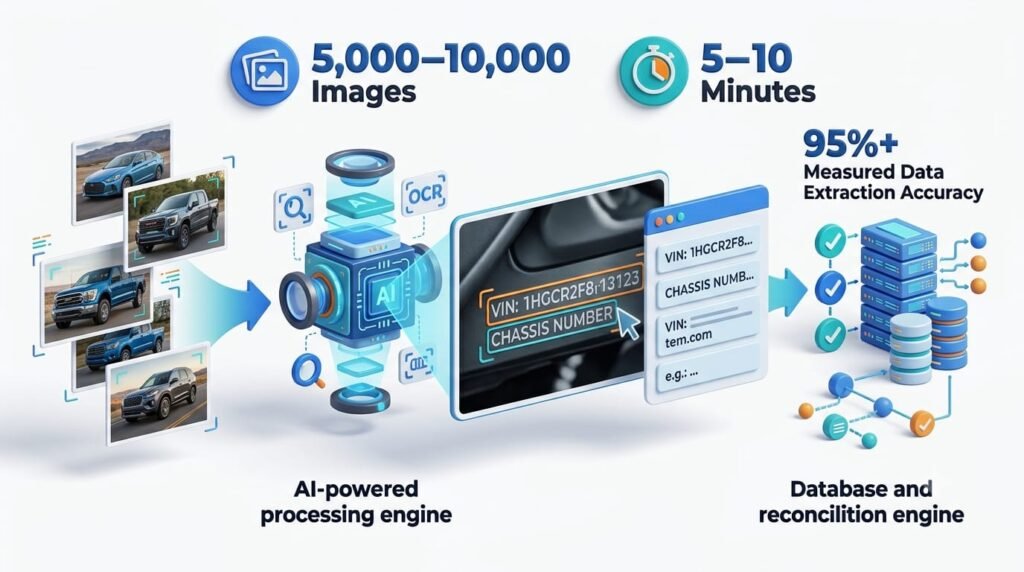
The solution can process approximately 5,000–10,000 vehicle images in 5–10 minutes, with measured extraction accuracy exceeding 95% under the evaluated operating conditions.
By automating repetitive processing and reporting activities, the solution reduces manual workload, accelerates audit preparation, and helps teams focus on discrepancies and verification rather than repetitive data entry.
The outcome is a more efficient, consistent, and scalable approach to vehicle stockyard auditing.
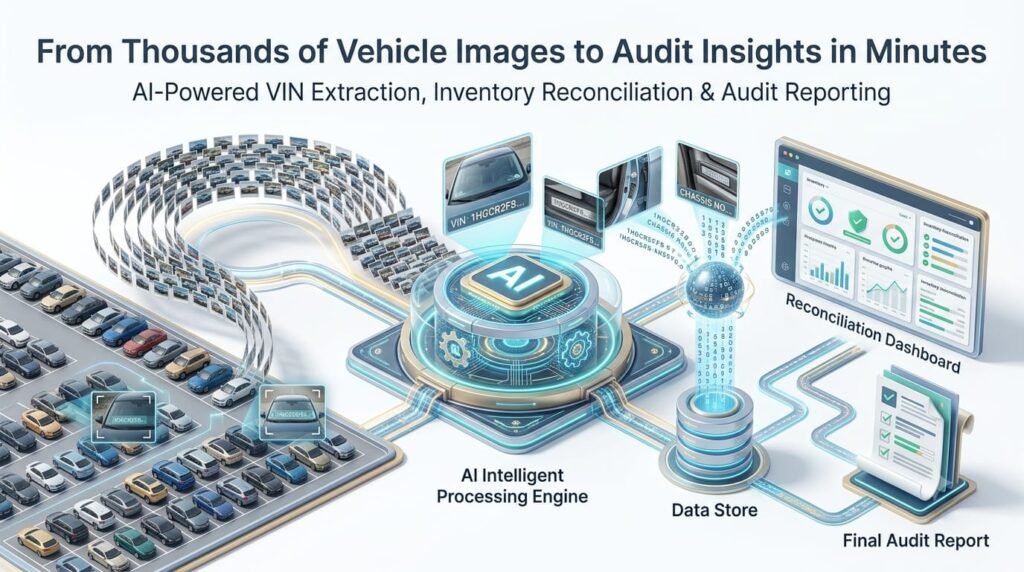
In automobile stockyard audits, banks and their audit teams need to verify whether vehicles represented in photographs correspond to the expected inventory records.
The process typically involves two major inputs:
These two sources must be connected to determine which vehicles have corresponding photographic evidence and which records require further investigation.
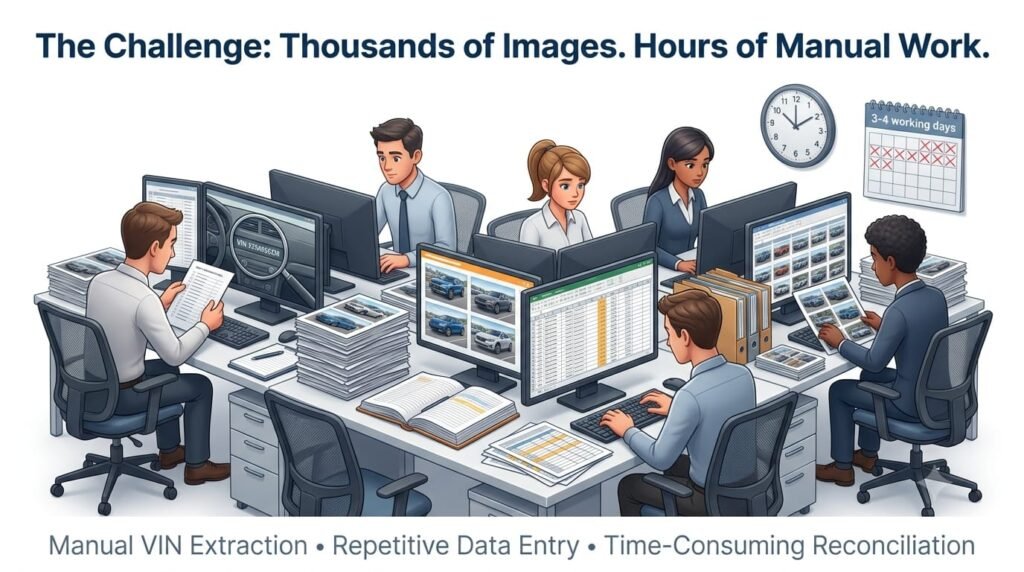
Before automation, the process involved manually reviewing images, reading identification numbers, entering values into spreadsheets, comparing datasets, and preparing the final audit report.
This created several operational challenges.
The audit team had to inspect large volumes of photographs to locate and read the relevant vehicle identification numbers.
When thousands of images were involved, opening and checking them individually became a repetitive and time-consuming task.
After locating the chassis number, employees had to transcribe it into a structured sheet.
Because vehicle identification numbers contain multiple characters, even a small transcription error could prevent a valid record from matching the corresponding inventory entry.
The extracted identifiers then had to be compared against the stockyard data provided by the bank.
The team needed to identify matching records, unmatched identifiers, inventory entries without corresponding image matches, and records requiring additional verification.
Performing these comparisons manually across large spreadsheets increased the workload and created opportunities for mistakes.
The manual workflow introduced several potential issues:
These challenges made consistency and timely reporting more difficult to achieve.
The overall manual process could take approximately three to four working days or longer, depending on image volume, data quality, and the complexity of the audit.
Approximately five to six team members could be involved in the extraction, checking, reconciliation, and reporting activities.
The business needed a way to process large volumes of evidence faster while maintaining appropriate validation and human oversight.
Analytx4t approached the challenge as a complete business process automation problem rather than simply an image recognition task.
The objective was to connect every major stage of the audit workflow into one structured process.
The solution combines:
Instead of manually processing every image and comparing every record, the audit team can use the automated workflow to produce structured results and focus on the records that require further attention.
The key transformation is the movement from manual evidence processing to automated, data-driven audit preparation.
The workflow begins with the stockyard inventory dataset and the associated vehicle photographs supplied for the audit.
The inventory dataset acts as the reference against which information extracted from the photographs is compared.
The system organizes the inputs for processing, creating a structured starting point for image analysis and reconciliation.
The AI-powered image-processing workflow analyzes the supplied photographs to identify the relevant vehicle information.
Instead of requiring employees to open every image and read the identification number manually, the system automates the repetitive image-processing stage.
The solution is designed to handle high-volume workloads, with approximately 5,000–10,000 images processed in 5–10 minutes under the evaluated operating conditions.
Image quality, lighting, and the visibility of the chassis number can affect extraction results. Images that cannot be processed confidently may require additional verification.
The system identifies and reads the VIN or chassis number visible in the vehicle photographs.
The extracted identifiers are converted into structured records that can be used by the reconciliation workflow.
This reduces the need for employees to manually read and enter thousands of identification numbers.
The solution has demonstrated measured extraction accuracy exceeding 95% in the evaluated process.
Validation remains important because an incorrectly extracted character can affect subsequent matching. Incomplete, unclear, or potentially incorrect values should be identified for review rather than automatically treated as verified.
After extraction, the system compares the identifiers against the stockyard inventory data provided by the bank.
This is one of the most important stages of the workflow.
Extracting a number is only the first step. The system must also determine whether that number corresponds to an expected inventory record.
The reconciliation process helps categorize the results into meaningful groups:
Automating these comparisons reduces repetitive spreadsheet work and makes potential discrepancies easier to identify.
An unmatched record indicates a discrepancy requiring investigation; it does not automatically establish that a vehicle is missing.
Once reconciliation is complete, the workflow organizes the records that need further attention.
Rather than requiring employees to manually recheck the entire dataset, the system helps highlight potential issues such as unmatched identifiers, incomplete values, and inconsistent records.
This allows the audit team to prioritize exceptions and investigate the underlying reasons.
For example, a mismatch may result from an incorrect extraction, an incomplete inventory record, a missing photograph, or a genuine inventory discrepancy.
The distinction matters because audit findings should be based on verified evidence rather than on an automated match status alone.
After reconciliation, the system generates a structured spreadsheet containing the extracted identifiers, corresponding inventory information, matching status, and relevant discrepancy details.
Previously, employees had to manually compile the results from image inspection, data entry, and record comparison.
Automating this stage reduces consolidation effort and provides a consistent format for reviewing the audit findings.
The spreadsheet becomes the central working document for investigating exceptions and preparing the final report.
The solution also generates an AI-assisted summary of the audit results.
Instead of requiring stakeholders to begin by reviewing thousands of spreadsheet rows, the summary presents the most relevant information in a concise format.
Depending on the available processing data, the summary can include:
This helps the bank and management team understand the overall reconciliation outcome more quickly.
The summary is grounded in the underlying processing results, while the consolidated spreadsheet provides the detailed records needed for verification.
The final stage brings together the consolidated spreadsheet and the AI-generated summary.
The completed audit output is prepared for sharing with the bank and the internal audit or management team through the applicable reporting process.
Stakeholders can review the results, examine individual records, investigate discrepancies, and determine the next steps.
This completes the workflow from raw vehicle photographs to structured inventory reconciliation and business-ready reporting.
The introduction of AI changes how the audit team spends its time and how quickly the processing results become available.
| Activity | Earlier Manual Process | AI-Powered Process |
|---|---|---|
| Image inspection | Employees manually reviewed large volumes of photographs | Automated image processing |
| VIN extraction | Manual reading and data entry | AI-powered identifier extraction |
| Data validation | Repeated manual checking | Structured validation and exception identification |
| Inventory matching | Manual spreadsheet comparisons | Automated reconciliation |
| Discrepancy identification | Manual checking across records | System-generated match statuses and exception categories |
| Spreadsheet preparation | Manual consolidation | Automated consolidated spreadsheet |
| Summary preparation | Manual review and report writing | AI-generated audit summary |
| Team effort | Approximately 5–6 team members could be involved | Less repetitive processing, with greater focus on verification |
| Processing time | Approximately 3–4 working days or longer for the overall manual process | Approximately 5–10 minutes for the image-processing benchmark and associated automated stages under suitable conditions |
The processing-time comparison distinguishes automated execution from the complete audit lifecycle. Human verification, exception resolution, and final approval can add time depending on the circumstances.
The solution can process approximately 5,000–10,000 vehicle images within five to ten minutes under the evaluated operating conditions.
This significantly accelerates the image-processing stage, allowing the workflow to move toward reconciliation and reporting much sooner.
For high-volume audits, this creates a more efficient foundation than relying primarily on manual image inspection.
The solution has demonstrated measured extraction accuracy exceeding 95% in the evaluated process.
This reduces the need to collect vehicle identification numbers manually and provides structured data for the subsequent reconciliation stage.
Extraction accuracy is distinct from end-to-end audit accuracy. Correctly reading a VIN does not automatically guarantee that the inventory match or final audit classification is correct, which is why validation and reconciliation remain essential.
Previously, approximately five to six team members could be involved in manual image processing, data extraction, reconciliation, and report preparation.
By automating repetitive tasks, the solution reduces the amount of time required for manual data handling.
Employees can focus more on investigating discrepancies, validating uncertain identifiers, reviewing important findings, and supporting audit decisions.
This is a shift in how the team’s time is used, rather than necessarily a reduction in team size.
The earlier workflow could take three to four working days or longer.
The automated workflow significantly shortens the image-processing and reporting stages, with suitable datasets processed in minutes.
This reduces the delay between receiving the audit inputs and making consolidated findings available for review.
A standardized workflow applies consistent extraction, validation, and matching rules across the dataset.
This reduces reliance on manual comparisons and helps make the process more repeatable.
It also helps identify records requiring additional verification before unresolved issues affect the final report.
The consolidated spreadsheet and AI-generated summary provide stakeholders with a clearer view of the reconciliation results.
Rather than waiting for a manually prepared report, the bank and management team can access structured findings sooner and focus on the records that require attention.
A workflow that automates image processing and reconciliation provides a more scalable foundation for high-volume audits.
As the number of images and inventory records grows, processing capacity can be scaled according to the operational requirements.
This is particularly valuable for recurring audits where the same general verification steps must be performed consistently across large datasets.
One of the key benefits of the solution is the potential reduction in repetitive employee effort.
The earlier workflow required people to inspect photographs, extract identifiers, enter data, compare records, consolidate results, and prepare the report.
The AI-powered workflow automates much of this repetitive processing.
To illustrate the potential workload, consider a hypothetical scenario in which five team members each spend one full eight-hour working day on an audit:
5 team members × 8 hours = 40 person-hours
For six team members working the same duration:
6 team members × 8 hours = 48 person-hours
These examples illustrate the scale of the manual workload; they are not measured savings from the client’s implementation.
The actual man-hours saved depend on how much of the original effort was spent on tasks now automated, the volume of exceptions, and the time required for human verification.
The business benefit is that employees can spend less time on repetitive data processing and more time on investigation, quality checks, and decision-making.
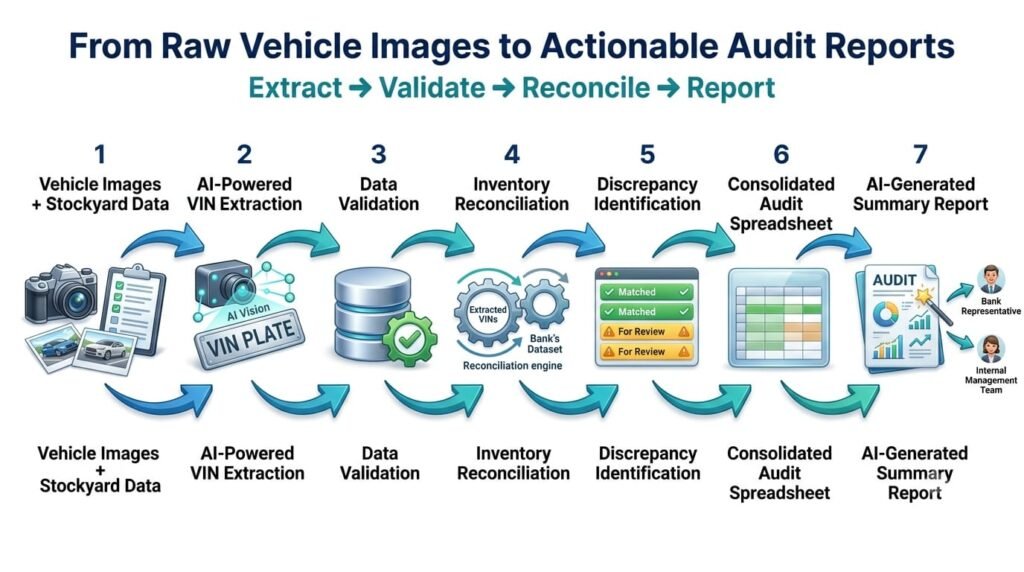
A system that only extracts text from images solves one part of the problem.
A complete audit workflow must also answer important business questions:
The solution connects these activities into a unified workflow:
Vehicle Images → VIN Extraction → Validation → Inventory Reconciliation → Exception Identification → Spreadsheet Generation → AI Summary → Final Reporting
This integration is what creates practical operational value.
The goal is not simply to recognize text in a photograph. It is to transform large volumes of visual evidence and inventory data into structured, reviewable information that supports the audit process.
In banking and inventory verification, speed must be balanced with reliability.
Although measured extraction accuracy exceeds 95%, some photographs may contain unclear, obscured, or incomplete identification numbers.
The workflow therefore needs to distinguish between successfully processed records and those requiring review.
Important safeguards include:
These controls help the team benefit from automation while maintaining appropriate human accountability.
The principle is simple: automate repetitive work, identify uncertainty, and keep people involved where verification and judgment matter.
The benefits extend across multiple stakeholders.
For banks and financial institutions
For audit teams
For operations and management
For the wider business
We focus on applying AI to business problems where repetitive tasks, fragmented data, and manual verification create operational bottlenecks.
This project demonstrates an important principle: AI creates practical value when it is integrated into the complete business workflow rather than used as an isolated capability.
Extracting a VIN from an image is only one step.
The larger solution connects extraction with validation, reconciliation, discrepancy identification, spreadsheet generation, AI summarization, and stakeholder reporting.
By bringing these stages together, we help transform large volumes of unstructured visual evidence into structured information that supports business decisions.
Our focus is not simply on introducing AI into an existing process. It is on redesigning the process so that people can spend less time collecting and consolidating information and more time reviewing findings and taking action.
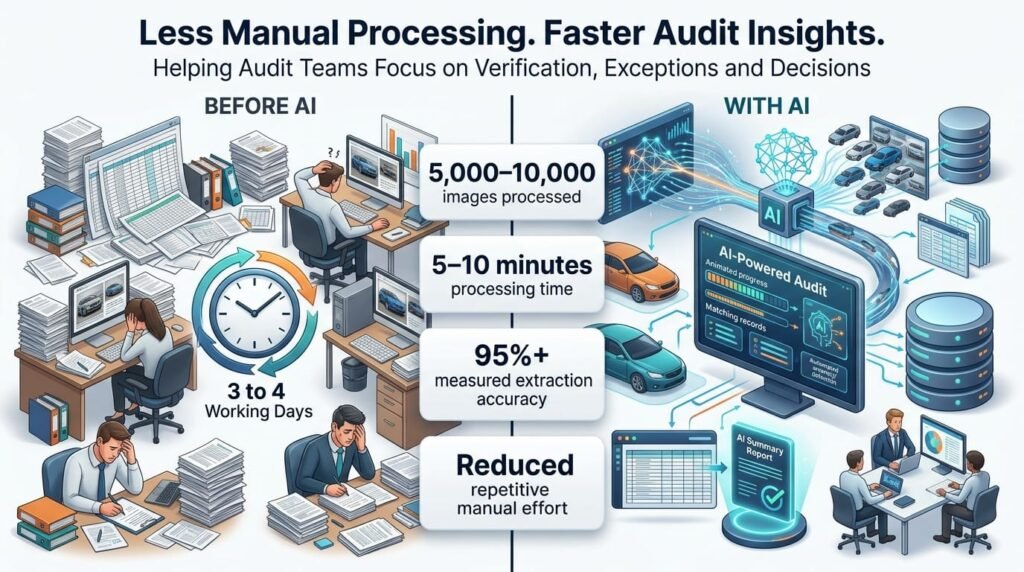
Vehicle stockyard auditing involves much more than reading chassis numbers from photographs. It requires connecting visual evidence with inventory data, identifying discrepancies, consolidating results, and preparing reports that stakeholders can use.
By combining AI-powered image processing, VIN extraction, automated reconciliation, spreadsheet generation, and AI-generated summaries, Analytx4t has helped transform this data-intensive workflow.
With the ability to process approximately 5,000–10,000 images in 5–10 minutes and measured extraction accuracy exceeding 95%, the solution demonstrates how AI can accelerate high-volume audit processing and reduce repetitive manual effort.
The result is a more efficient approach to audit preparation, with faster processing, more consistent reconciliation, and greater focus on records that require human attention.
The real transformation is not just processing images faster. It is turning thousands of images and inventory records into structured audit insights that businesses can act on.
We believe that is where enterprise AI creates meaningful business value: helping organizations execute important processes faster, more consistently, and with appropriate human oversight.
Recent Comments